TFT USB Driver Installer v2.0: All-In-One Mobile Driver Solution (2025)
| Views: 10 | Basic | |
Download TFT USB Driver Installer v2.0 (2025). The ultimate all-in-one solution for installing Samsung, Huawei, Motorola, Qualcomm, and SPD drivers on Windows.
TFT USB Driver Installer v2.0: The Ultimate All-In-One Solution (2025)
Connecting mobile devices to a PC for repair, flashing, or debugging can often be frustrated by missing or incompatible drivers. The TFT USB Driver Installer v2.0 (2025 Update) solves this by providing a comprehensive, unified interface to manage and install drivers for almost every major smartphone brand and chipset.
File Details & Download Info
Here are the technical details for the latest version of the installer.
| App Name: | TFT USB Driver Installer |
| Version: | v2.0 (2025 Edition) |
| Developer: | TFT Team |
| File Size: | Approx. 142MB |
| Key Feature: | All-in-One Driver Pack (Samsung, MTK, SPD, Qualcomm) |
| OS Support: | Windows 10 / 11 (32-bit & 64-bit) |
| License: | Freeware |
Why You Need TFT Driver Installer v2.0
This tool is essential for technicians and developers working on:
- Android Development: Debugging apps on real devices.
- Firmware Flashing: Unbricking devices using tools like Odin, SP Flash Tool, or Unlock Tools.
- Connection Fixes: Resolving “USB Device Not Recognized” errors.
- Specialized Hardware: Working with devices requiring specific protocol drivers like QDLoader or SPD.
Key Features & Supported Drivers
The 2025 update brings enhanced compatibility for modern systems:
- Unified Interface: Manage all drivers from a single wizard.
- Libusb-win32 Integration: Advanced filter driver support for specialized device access.
- Protocol Drivers: Includes QDLoader (Qualcomm), SPD (Spreadtrum), and UsbDk 1.0.22.
- Brand Support:
- Samsung USB Drivers
- Motorola Device Drivers
- Huawei & LG Drivers
- Intel Android Drivers
- New in 2025: Support for Android 14 & 15 devices and optimized performance for Windows 11 22H2.
How to Use TFT Driver Installer
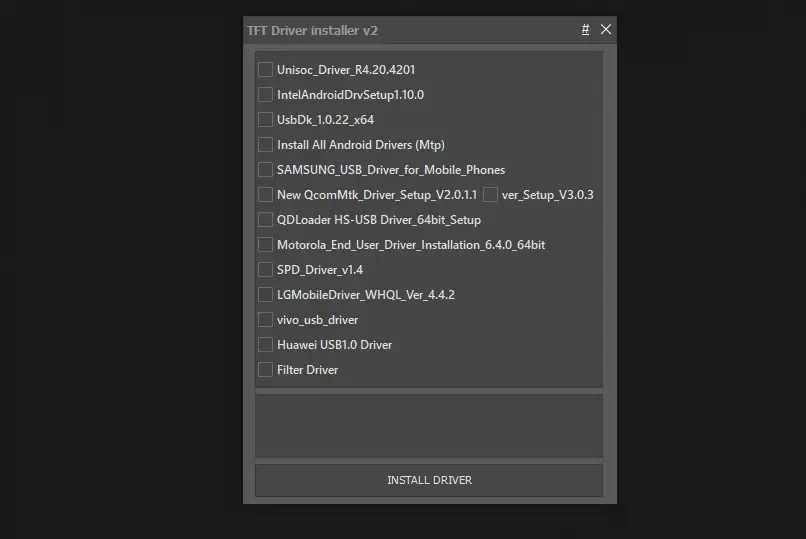
Step 1: Preparation (Important)
Before installing, it is recommended to disable Driver Signature Enforcement to ensure all unsigned drivers install correctly.
- Download and run the TFT BCD Edit Tool (often included or available separately).
- Use the tool to Enable Windows USB Driver Signature mode.
- Restart your PC if prompted.
Step 2: Installation
- Extract the TFT Driver Installer v2.0.zip file.
- Run the setup file as Administrator.
- The main interface will launch. You will see options for the libusb-win32 filter installer first.
Step 3: Selecting Drivers
The panel allows you to choose exactly what you need:
- Filter Driver: Installs the basic LibUSB filter (Recommended for general connectivity).
- Manufacturer Drivers: Select specific brands like Samsung or Motorola if you are working on those devices.
- QcomMtk / SPD: Select these for chipset-level flashing (EDL/Brom modes).
Step 4: Finish
Click Install and wait for the process to complete. Once done, restart your computer to ensure all drivers are loaded correctly.
System Requirements
- OS: Windows 10 or Windows 11 (Latest Builds supported).
- Processor: Intel or AMD (x64/x86).
- Storage: 50 MB free space.
- Ports: USB 2.0 or 3.0.