TFT MTP Bypass Tool v5.0 Download (2025): Unlock Samsung FRP & Enable ADB
| Views: 8 | Basic | |
Unlock any Samsung device with TFT MTP Tool v5.0 PRO. Features include Browser MTP launch, Odin mode FRP erase, and Baseband repair.
TFT MTP Bypass Tool v5.0: Samsung Frp Unlocker (2025)
If you are struggling with a locked Samsung device due to FRP or need to enable ADB quickly, the TFT MTP Bypass Tool v5.0 is your solution. This PRO version update for 2025 offers a seamless way to unlock Samsung devices, perform factory resets, and access hidden settings with just a single click.
File Details & Download
Below are the technical details for the latest release of the TFT MTP Bypass Tool.
| App Name: | TFT MTP Bypass Tool |
| Version: | v5.0 PRO (2025 Update) |
| Developer: | TFT Team |
| File Size: | Approx. 100 MB |
| Key Feature: | 1-Click Auto Enable ADB & FRP Reset |
| Supported Modes: | COM, MTP, ADB, ODIN |
| License: | Freeware |
Key Features of v5.0
This tool is divided into four main operational modes to handle various unlock scenarios.
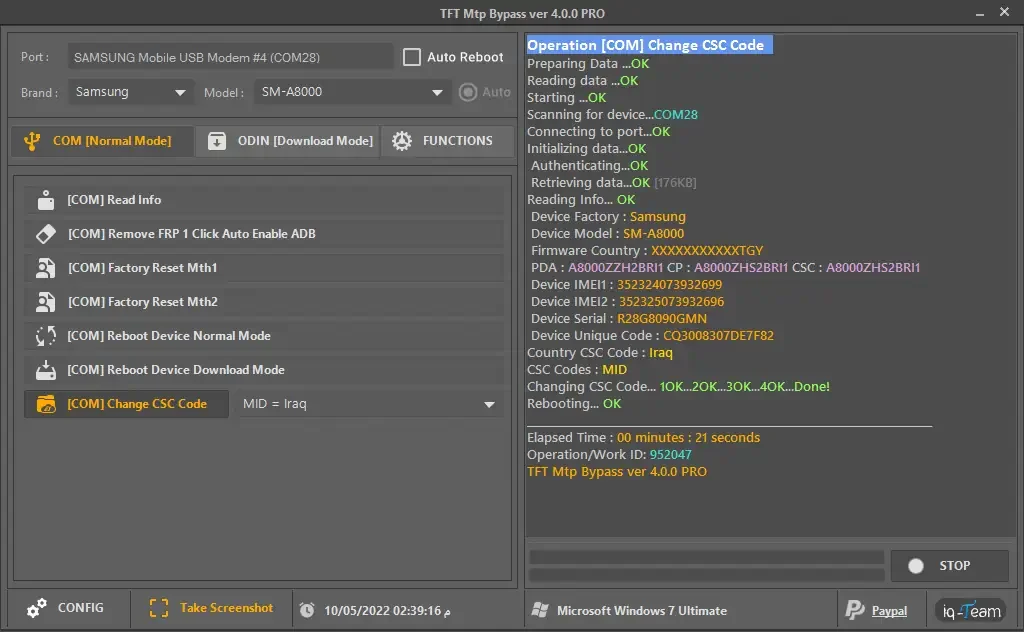
1. COM (Normal Mode) Functions
- Remove FRP 1 Click Auto Enable ADB: The flagship feature—bypass FRP and enable USB debugging instantly.
- Factory Reset (Mth1 & Mth2): Two distinct methods to wipe the device if standard resets fail.
- Reboot Device: Quickly restart the device back to normal mode after operations.
2. ODIN (Download Mode) Functions
- Erase FRP: Remove the Google Lock directly from Download Mode.
- Erase Knox: Disable Knox security features to allow custom modifications.
- Repair Tools: Fix Baseband issues, remove “Please Call Me” messages, and write ENG EFS files.
3. MTP & ADB Functions
- Browser Launch: Open YouTube or Hidden Galaxy Store settings to bypass FRP manually via Direct Alliance.
- Huawei Support: Enable ADB and remove FRP on supported Huawei models.
- Remove Lock Screen: Delete the system UI to bypass the PIN/Pattern lock (Root/ADB required).
How to Use TFT MTP Bypass Tool v5.0
- Download & Install: Get the v5.0 PRO setup file and install it on your Windows PC.
- Connect Device: Plug your Samsung phone into the PC. Ensure the tool detects it on the correct COM Port (e.g., Port 115200).
- Select Mode: Choose the tab that matches your phone’s state (e.g., COM for active devices or ODIN for Download Mode).
- Execute: Click “Remove FRP 1 Click Auto Enable ADB”.
- Watch Screen: Allow USB Debugging on your phone screen if prompted. The tool will finish the job and reboot the device automatically.