TFT MTK Module v6.2.0 Premium Download: Samsung & Xiaomi FRP Unlocked
| Views: 9 | Basic | |
Download TFT MTK Module v6.2.0 Premium for free. New update includes Samsung A12/A32 one-click FRP reset, Xiaomi Mi Account removal, and Oppo Safe Format methods.
TFT MTK Module v6.2.0 Premium: The Ultimate MediaTek Unlock Tool
The TFT MTK Module v6.2.0 Premium is a powerful, all-in-one utility designed for professional mobile technicians. This latest update brings massive improvements for MediaTek devices, including Samsung One-Click FRP Reset without test points, Safe Format (Keep Data), and advanced partition management. It supports a vast range of brands like Xiaomi, Oppo, Vivo, Realme, and Huawei.
File Details & Download
Below are the technical details for the latest version of the TFT MTK Module.
| Tool Name: | TFT MTK Module |
| Version: | v6.2.0 Premium |
| Developer: | TFT Team |
| Supported Chipsets: | MediaTek (MTK) & Dimensity |
| Key Feature: | Samsung No Test Point FRP, Safe Format |
| License: | Freeware (Premium Features Unlocked) |
New Features in v6.2.0 Premium
1. Samsung-Specific Tools
The standout feature of this update is the ability to handle Samsung MTK devices with ease.
- One-Click FRP Reset: Supports A10s, A03s, A12, A31, A32, and A02 models without needing to open the phone for a Test Point.
- KG & MDM Reset: Reset Knox Guard and Mobile Device Management locks.
- Crash to BROM: Force devices into BROM mode if they are stuck.
2. Enhanced Security Operations
- Safe Format (Keep Data): Reset the screen lock without losing user photos or contacts (Supported models only).
- Bootloader Operations: Unlock and Relock Bootloader via BROM mode instantly.
- Auth Bypass: Bypass the SLA/DA authentication on secure MTK chips.
3. Partition & IMEI Management
- Repair IMEI: Fix Null/Invalid IMEI and “Unknown Baseband” issues.
- Backup/Restore: Full backup for NVRAM, NVDATA, EFS, and Boot partitions.
- RPMB Management: Read, Write, and Erase RPMB data for advanced repairs.
4. Meta Mode Functions
- Factory Reset: Wipe data safely via Meta Mode.
- Erase Metadata: Clear metadata partitions to fix boot loops.
- Payload Injection: Boot into Meta Mode directly using payload injection.
Supported Brands & Models
This version adds support for hundreds of new devices, including:
- Samsung: Galaxy A32 5G, F42 5G, A03s, A12, A02 Series.
- Xiaomi/Poco: Redmi Note 11/12 Series, Poco M4 Pro, Mi 11 Series.
- Oppo/Realme: Reno 8 Pro, F21 Pro, Realme 8i, 9 Pro 5G, Narzo 50A.
- Infinix/Tecno: Note 11 Pro, Hot 10S, Camon 18, Pova 2, Spark 8 Pro.
- Others: Huawei Enjoy/Nova series, Vivo, Meizu, Lenovo, and more.
How to Use TFT MTK Module v6.2.0
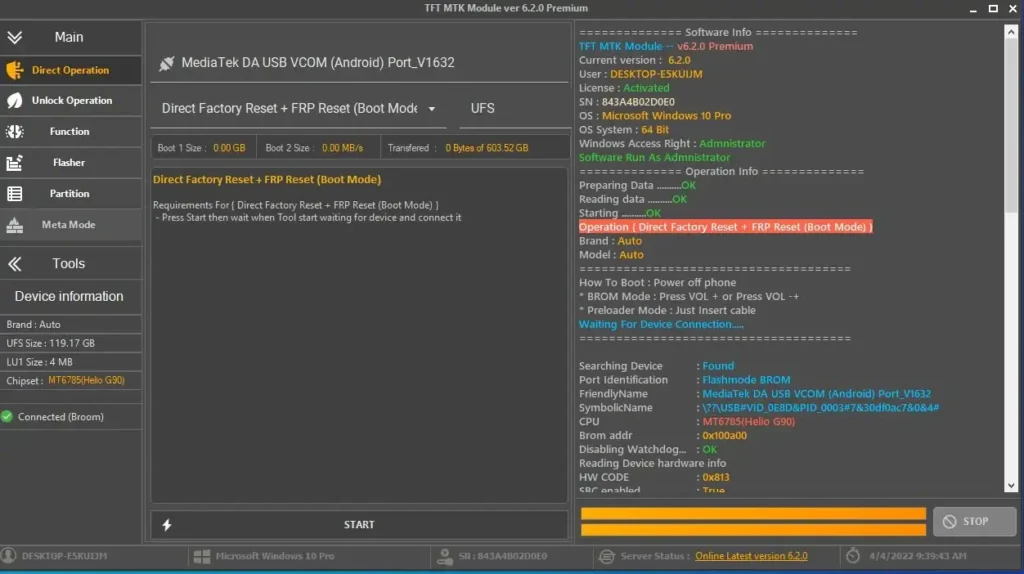
- Download & Install: Get the setup file from the link above and install it on your Windows PC.
- Launch: Run the tool as Administrator.
- Select Brand: Choose the brand (e.g., Samsung) and model from the list.
- Choose Operation: Click on the desired function, such as “Reset FRP” or “Safe Format”.
- Connect Device:
- For BROM Mode: Power off the phone, hold Volume Up + Down, and connect USB.
- For Samsung FRP: Connect in MTP or Download mode as instructed by the tool.
- Wait: The tool will detect the device and perform the operation automatically.